Clips Desktop Native Recording - upload during the recording#2009
Conversation


This comment has been minimized.
This comment has been minimized.
This comment has been minimized.
This comment has been minimized.

|
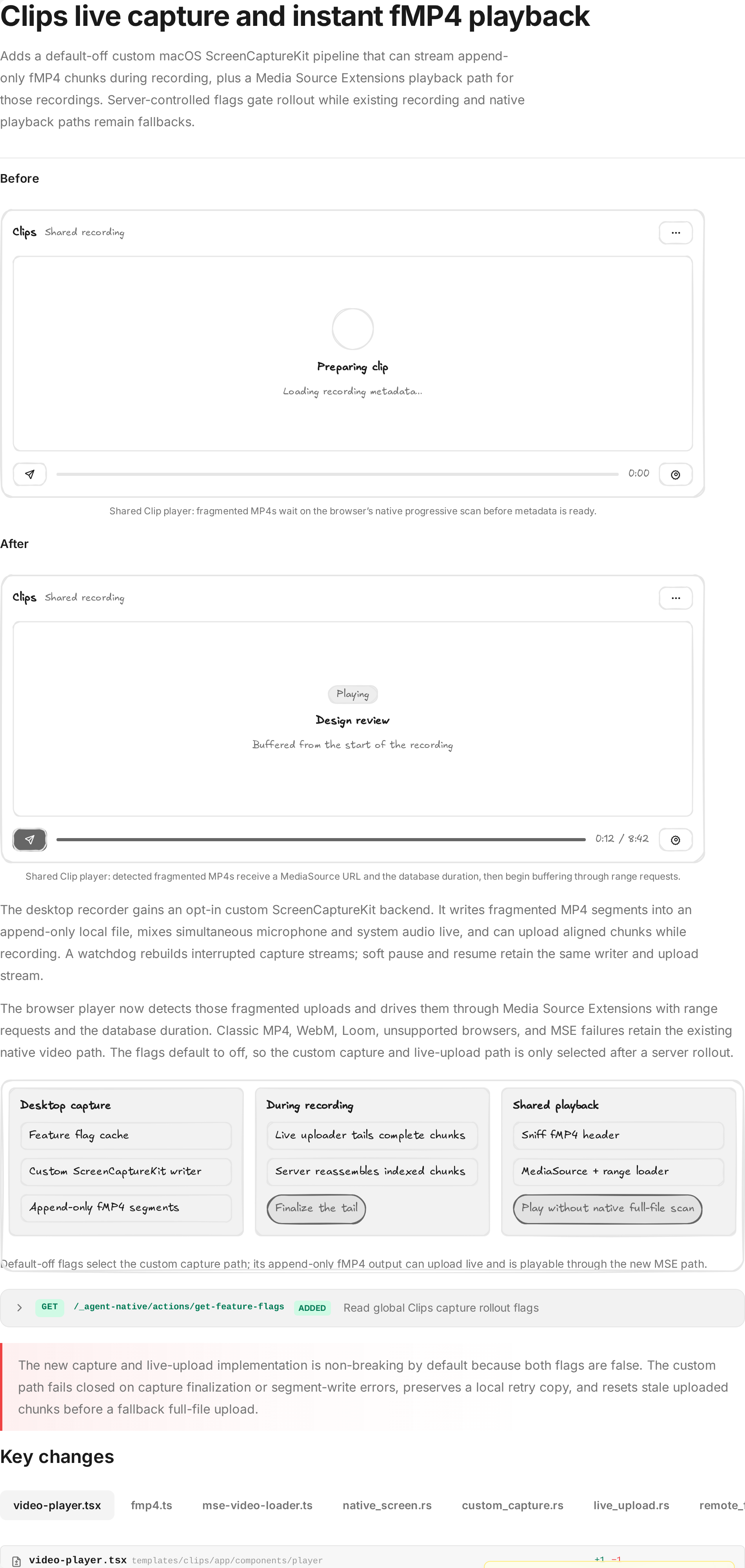
Here's a visual recap of what changed: Open the full interactive recap |
This comment has been minimized.
This comment has been minimized.
This comment has been minimized.
This comment has been minimized.
This comment has been minimized.
This comment has been minimized.
This comment has been minimized.
This comment has been minimized.
This comment has been minimized.
This comment has been minimized.
This comment has been minimized.
This comment has been minimized.
This comment has been minimized.
This comment has been minimized.
This comment has been minimized.
This comment has been minimized.
This comment has been minimized.
This comment has been minimized.
This comment has been minimized.
This comment has been minimized.
This comment has been minimized.
This comment has been minimized.
 shomix
changed the title
shomix
changed the title
![builder-io-integration[bot]](https://avatars.githubusercontent.com/in/353721?s=60&v=4)
This comment was marked as outdated.
This comment was marked as outdated.
Sorry, something went wrong.
This comment was marked as outdated.
This comment was marked as outdated.
Sorry, something went wrong.

There was a problem hiding this comment.
Builder reviewed your changes and found 3 potential issues 🔴
Review Details
Code Review Summary
This incremental review evaluated the latest fixes to the native capture failure path and the MSE loader. The previously reported append-failure propagation and EOF seek-backup issues now have explicit handling and were not reposted. The earlier pathname-cache concern was also not repeated, consistent with developer feedback. The remaining architecture is generally sound: writer failures are retained through finish(), the MSE loader backs up its realignment probe, and live upload finalization remains coordinated by explicit control atomics.
New Findings
- 🔴 HIGH — The live-upload success branch can clear the local retry copy and report success even when custom writer finalization recorded a real segment/file I/O failure, silently accepting a truncated upload.
- 🟡 MEDIUM — Duration updates arriving during an MSE append are stored but never applied after
sourceBuffer.updatingclears, leaving the MediaSource timeline stale. - 🟡 MEDIUM — Once
MediaSource.endOfStream()is called, later seeks into ranges evicted for quota management cannot reopen the source or refetch the missing data.
🧪 Browser testing: Will run after this review (PR touches UI code).
| return match result { | ||
| Ok(bytes) => { | ||
| clear_saved_recording_after_success(&app, &saved); | ||
| emit_native_upload_finished(&app, &server_url, &recording_id, true, None, None); |
There was a problem hiding this comment.
🔴 Do not report live upload success after writer I/O failure
The live-upload result is treated as authoritative here, but CustomScreenCaptureWriter::finish() can already have returned a real segment-sink/file write error in stop_outcome. If the server finalizes the prefix that was uploaded before that error, this branch clears the saved local recording and emits success, silently losing the unwritten tail. Before the Ok(bytes) branch, fail closed on capture-side finalization errors and retain the retry copy.
Additional Info
Found by one reviewer and verified against finish() propagating segment sink failures at custom_capture.rs:1009-1011.

| // Only writable while the source is open and no append is in flight; | ||
| // otherwise `onSourceOpen`/seek re-read `opts.durationMs`, so a skip here | ||
| // is harmless. | ||
| try { | ||
| if ( | ||
| this.mediaSource.readyState === "open" && | ||
| !this.sourceBuffer?.updating | ||
| ) { | ||
| this.mediaSource.duration = durationMs / 1000; |
There was a problem hiding this comment.
🟡 Apply duration changes after an append completes
setDuration() updates opts.durationMs but skips mediaSource.duration whenever sourceBuffer.updating is true. There is no updateend retry or other later write, so a duration increase that arrives during an append can leave the MediaSource timeline permanently shorter than the current recording. Queue the pending duration and apply it when the append finishes.
Additional Info
The hook intentionally pushes polling updates in place; current loader has no later duration application path.
| private tryEndOfStream(): void { | ||
| if (this.mediaSource.readyState !== "open") return; | ||
| if (this.sourceBuffer?.updating) return; | ||
| try { | ||
| this.mediaSource.endOfStream(); |
There was a problem hiding this comment.
🟡 Allow refetching evicted ranges after end of stream
After tryEndOfStream() calls mediaSource.endOfStream(), runPump() only fetches while the MediaSource is open. A later seek resets eofReached, but it cannot reopen the ended source. If quota eviction removed older buffered ranges from a long recording, backward seeking after EOF can therefore stall without refetching the evicted bytes. Recreate/reopen the MSE source for post-EOF seeks or avoid ending the source while seek-driven refetches are still possible.
Additional Info
The loader explicitly evicts old ranges under quota pressure and onSeeking only resets eofReached.

2 participants


This PR adds support to upload the fullscreen native (clips desktop rust side) videos while they are being recorded.
Instead of recording the whole video, then uploading it after you press Stop, the recording is uploaded to the server while it is still being recorded. The result is that pressing Stop finishes almost instantly, even for long recordings, instead of waiting for a large upload.
The new pipeline is disabled by default. It is controlled by feature flags stored in the database (the global
feature-flagssettings entry - this is being added with this PR), so it can be turned on or off without shipping a new build. SetuseCustomSCKPipelinetotrueto use the new recorder, andcustomSCKPipelineLiveUploadEnabledtotrueto also stream the upload during recording. With both off, the app behaves exactly as it does today.For the new flow to take affect this needs to be set in the
settingstable in the db.key:feature-flags,value:{"useCustomSCKPipeline":true,"customSCKPipelineLiveUploadEnabled":true}To disable it set the value to:
{"useCustomSCKPipeline":false,"customSCKPipelineLiveUploadEnabled":false}Piece 1: Custom capture engine (desktop, Rust)
A new desktop recording engine that Clips controls directly, instead of relying on Apple's built-in recorder. This is what makes streaming-while-recording possible.
templates/clips/desktop/src-tauri/src/native_screen/custom_capture.rsApple's stock recorder (
SCRecordingOutput) is a black box: it owns the fileand the file is unreadable until recording ends. To upload during recording we
must control how the file is written, so this branch adds a custom pipeline:
Key design points, each earned through a real failure during testing:
file. Apple hands us each ~1-second segment as bytes
(
AVAssetWriterDelegate), and our code appends them to the local file.Result: bytes, once written, never change — the property the live upload
depends on. (The earlier
movieFragmentIntervalapproach failed subtly:Apple silently rewrites the whole file at Stop, which corrupted everything
already uploaded. See "war stories" below.)
independent clocks and warm-up delays.
LiveAudioMixerplaces both on ashared 48kHz timeline (zero-filling gaps, tolerating a source that stalls or
never starts) and emits one premixed track — so no post-recording ffmpeg mix
is needed.
since boot". Every sample is re-timed onto a session timeline starting at 0
(otherwise players show wall-clock times like
16:58:38).pixel formats when an HDR app is frontmost, and the H.264 encoder rejects
every frame from then on.
desktops) SCK sends "idle" frames; dropping them starves the video track and
freezes the whole file. Any frame carrying an image buffer is appended.
kills fragmented writers; disabling it fixed recordings dying at exact
1-second boundaries. An explicit bitrate budget (~0.15 bits/pixel/frame)
keeps files small enough to skip the upload-time transcode.
(Space switches, display sleep) — sometimes with a callback, sometimes
silently. A watchdog thread notices (no buffers for 4s, or an OS "stream
stopped" report) and rebuilds the SCStream in place; the writer and file
survive. A user clicking macOS's own "Stop Sharing" is recognized
(
UserStoppederror code) and triggers the normal stop flow instead of afight.
fragments, it is playable up to the last written second even if the app
dies mid-recording.
Safety net around all of it: every AVFoundation call that can throw an
Objective-C exception is contained (
objc2::exception::catch) — otherwise asingle bad sample aborts the entire process — and append failures record a
detailed NSError (domain/code/underlying OSStatus) instead of a generic
message. Those error codes are how most of the bugs above were found.
Piece 2: Live upload (desktop, Rust)
templates/clips/desktop/src-tauri/src/native_screen/live_upload.rsA background task tails the growing file and streams it to the server:
Piece 3: MSE playback (web player, TypeScript)
app/lib/mse-video-loader.ts,app/lib/fmp4.ts,app/hooks/use-mse-video-source.ts,wired into
app/components/player/video-player.tsxThe streamed files have one unavoidable quirk: they cannot state their own
duration up front (the file's header is written — and uploaded — at second
zero of the recording, when the duration doesn't exist yet; no container
format escapes this). A plain
<video src>player reacts by downloading theentire file looking for the duration before showing anything — from a CDN
that's an endless spinner.
Fix: for these files only, the player uses Media Source Extensions — our
JavaScript fetches the bytes and feeds the decoder, instead of the browser
guessing:
durationMs, always stored) — setprogrammatically, no scanning, first frame after a few hundred KB.
mvexbox?) — classic MP4s,WebM, and Loom embeds keep the native path byte-for-byte unchanged.
ranges are evicted to bound memory; any failure falls back to the plain
<video src>path (i.e. worst case = old behavior).rejects, so MSE reads go through the app's existing same-origin
/api/video/:idproxy (the same route the editor's waveforms use). Thenative
<video>path keeps the direct CDN URL.This player is also what the Chrome extension shows inside GitHub PR previews
(it renders
/embed/:id), so GitHub playback inherits the fix automatically.Endpoint that returns feature flags for clips desktop app
Desktop Clipwithout rebuilding the app. This works by adding a new actionget-feature-flagsthat returns the values for this feature flags. This action is called by clips desktop at startup, and is updated every 1m. If the desktop cannot fetch the value for some reason, the new flags will fallback tofalse.